ComboStrap - Release 1.13
About
The release 1.13 was focus on the creation of landing page components. This is the first landing page release. The next will be landing page perfect with full animation and layout.
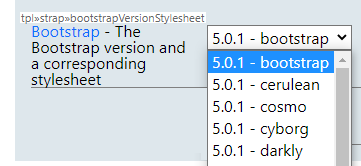
Due to introduction of Bootstrap 5 in this release, a configuration update is require. As the bootstrap version and the stylesheet are now in the same configuration, you need after the update to set it back to your preferred stylesheet back.
Changes / New
Bootstrap 5
New: Bootstrap 5 is now the default. Read more about the bootstrap migration on this page: ComboStrap - Release 1.13 - BootStrap 4 to 5
Animation
- New: added the hover animation to improve emphasis
Landing page
- New: The slide component to create landing page with sections of a page or hero section with alternated background
- New: added the background component to manage the background of a component (at first for a slide)
- New : clickable attribute: make a whole surface containing a link, clickable.
Svg
- New: SVG Optimization - The Svg returned are now optimized. They are injected inline for file less than 2KB such as icon, they are otherwise loaded lazily and injected via javascript.
- New: SVG Upload Permission - The Svg can now be uploaded by the admin and by a group of users.
Styling / Theme
- New: Elevation is also now known as the shadow attribute and has gain 2 levels.
- New: The Bootswatch stylesheet are now also served from the CDN (by default)
- New: The table component does not take 100% width to reduce the visual space and allow floating element to the right.
- New: float - the float styling attribute has been added.
- New: added styling class to all component. It permits to take over the whole styling and create its own via the userstyle stylesheet.
Performance
- New: Lazy loading is now part of Combostrap and the default
Raster Image
- New: the image component accepts now styling attributes
- New: Raster Images are now lazy loaded by default
- New: Raster Images Retina Support. The image may be downloaded at a size that depends on the screen resolution (device pixel ratio) and not on the screen size.
- New: SVG Lazy loading - The big Svg file are now only loaded when they are going to become visible.
- New: SVG Injection - The big Svg file are downloaded and injected as SVG markup.
- New: Image got the defaultImageLinking configuration to set the default media link behavior
- New: Image with a width are media aware. The width will be 100% for a screen size below the width to make them fully responsive.
Layout
- New: auto layout is supported on a grid where the columns takes the natural width of their content and never overflow.
- New: If there is no bar, the main content is centered with a max length of 9 cols.
- New: A Layout by page can be specified.
Security
- New: Security, the csp directive are not statically saved in the template but added dynamically when the html headers are printed. It helps to have uniform on all pages (main, details and mediamanager)
UI Component
- New: A Link by default cannot be written on multiple line to avoid having strange behavior. The enableMultiLinesLink configuration permits to control this behavior.
- Improvement: preformatted (indented code block) is now enable by default with prism styling but prints nothing when the line has only blank spaces to avoid confusion.
Markup perfect
Markup perfect means that there is no need to tweak the output via styling.
- New: Typo - the title styling class display-1 to display-6 are now responsive on Bootstrap 4
- Update: The test are testing now that the HTML generation is XHMTL compliant. This is no more done with the hand.
- New: Bootstrap perfect: We generate exactly the same markup than bootstrap. card and blockquote have now bootstrap paragraph with the text class making them easier to read.
- New: Template Protection: We empty the php buffer before printing and send a message to admin user. Otherwise, plugins that print directly may mess the page completely.
- Improvement: For boolean attributes such as selected for a panel tab, this is no more needed to specify the value. ie selected is equivalent to selected=true
- Improvement: A note is now markup perfect (a stack) and accepts paragraph inside
- New: floating right will add a margin at the left.
Bug
- Bug: A image link points to the page now and not to the image.
- Bug: Backlinks are now correctly rewritten when moving a page. The backlinks that were not in first position were be badly rewritten from [[id|description]] to [[newid]]|description]]