
About
The combo plugin contains all components:
- The theme
- The router
- The Page Metadata
- The SEO module
- and many more.
Steps
Pre-requisites and options not supported
Last Dokuwiki Version:
In case, you have not followed the server step, you should install ComboStrap on the last DokuWiki version.
If you don't know the version of your installation, the dokuwiki version check will help you.
DokuWiki Internal rewriting:
Because of the permanent url functionality, Combostrap:
- does not support the URL DokuWiki Internal rewriting (option 2)
- but supports nice url via the web server
Go to the Extension Manager
To install the Combo plugin:
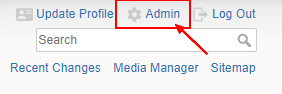
- Click on the Admin link to go to the Admin Window. ie https://yourdomain.com/?do=admin
- Click on the Extension Manager link to go to the Extension Manager plugin.
- Click on the Search and Install link to go to the Search tab
Install the SQLite extension
combo is saving its data in a sqlite database and therefore uses this extension.
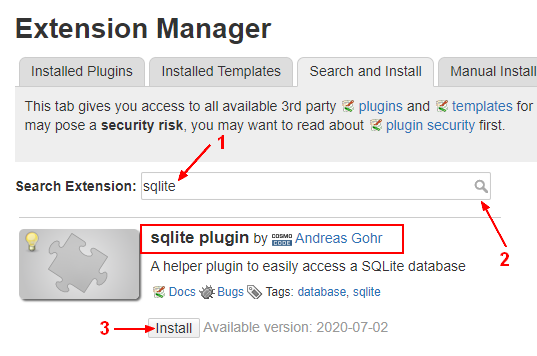
- Search for the term sqlite
- Click on the install button.
Do you have any other plugins ?
ComboStrap is tested against third party plugins but we can't test them all.
This application has a large code base going from cache to routing and user interface management.
Plugins that are too old or do not respect the DokuWiki Interfaces may not work well with ComboStrap.
Install the Combo extension
Because of the memory error of the update plugin, Combo needs to be updated manually via the manual install tab.
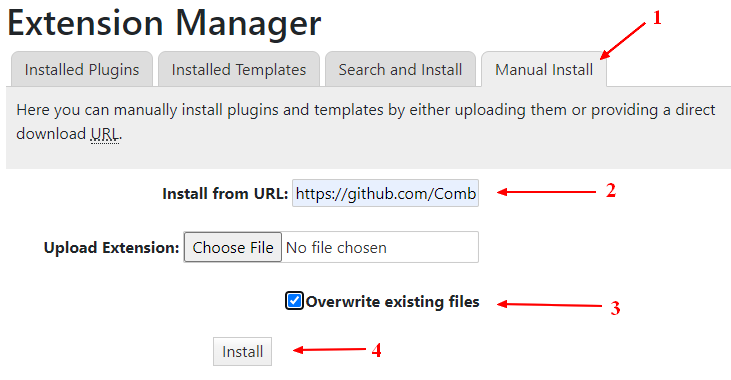
- In the extension manager, click on the manual install tab
- Enter the Github Url: https://github.com/ComboStrap/combo/archive/main.zip
- Check the box Overwrite existing files
- And click the install button.
- Don't worry. if you get any problem, the next section explains how to revert it back.
Do you have a broken Installation?
If this is the case and that you got your installation not working anymore, the fix is:
- to rename on your server the directory dokuwiki/lib/plugins/combo to dokuwiki/lib/plugins/combo.old
- or to delete it
And to send us the log of your webserver if you want us to take a look.
Next Step
In the next step, you will learn to install a favicon